Internal tools for companies with an office
Once a company has a few dozen people or more, everyday matters scatter across Excel, calendars and email. I build internal tools that bring order to them: with sign-in by company account and running on your own server. I have built such a platform entirely on my own.
You are here: Services.
What usually gets in the way
The things I hear most often. If you recognise even two, it's worth talking.
- The shift schedule lives in Excel: hours and working-time norms are counted by hand, and changes go out by email.
- Managers' conversations with their people have no agenda and no record, so agreements are lost within a week.
- Parking and rooms are booked as calendar meetings: you can't see what's free, and forgotten bookings block spaces.
- Tasks between departments travel by email and nobody knows where they stand.
- The office TVs show what someone uploaded a month ago, or nothing.
- A new person means accounts in several systems, and someone leaving means a clean-up that's easy to forget.
What I can do
Each of these solutions can work on its own. We start with the one that gives the most.
Modules instead of workarounds
Schedules, 1:1 meetings, reviews, tasks, bookings, screens: each module solves one workaround and works on the same data about people and structure.
Custom softwareSign-in with the company account
Active Directory instead of more passwords. Access follows groups in the directory, so a new person has it from day one and loses it automatically on leaving.
IT infrastructureOn your own server
Data about people, reviews and meetings doesn't have to go to someone else's cloud. The application can run on the company's server, with backups and an event log.
IT infrastructureConnected to what already works
Helpdesk, spreadsheets, calendars and the user directory: the new tool reads data from them instead of asking for it to be retyped.
Process automation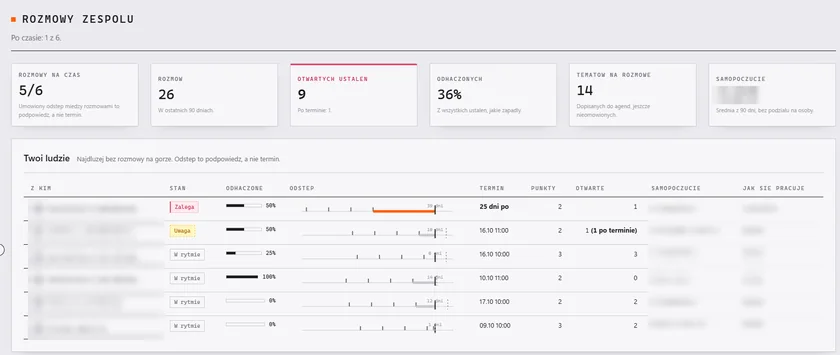
Where to start
A suggested process. We'll fit the details to the company. How I work
- 01Conversation
We work out which workaround costs you the most time or nerves. That's where we start.
- 02The first module
One thing that works end to end, for example bookings or 1:1 meetings, instead of everything at once.
- 03Deployment at your company
On the company's server or in the cloud, with sign-in by company account, backups and instructions.
- 04More modules
Once the first one has caught on, we add the next ones. Shared sign-in, permissions and data are already there.
Questions and answers
Don't see your question? Write to me.
Wouldn't it be better to buy a ready-made system?
Often, yes. If an off-the-shelf program does what you need, buy it: it will be cheaper and faster. Your own tool makes sense when you need several things in one place, sign-in by company account, data on your own server or a process that ready-made systems don't support.
Do we need an IT department?
No, but it helps to have someone on your side with access to the server and accounts. I can also take care of maintenance: updates, backups and fixes.
Can the data stay on our server?
Yes. The application can run on a server in the company, with access following groups in Active Directory. Then data about people doesn't go to outside services.
How long does the first module take?
It depends on the scope, which is why we start with one module that can be delivered quickly and tried in everyday work. I give the timeline after a conversation, in writing, together with the scope.
Is something in the office still running on workarounds?
1:1 meetings, bookings, schedules, screens: write what takes up most of your time.Services that help here
Custom software and internal tools
Small apps and internal dashboards, for example for bookings, handling requests or keeping records.
More about the serviceCustom web and mobile apps
I build apps that run in the browser and on the phone: bookings, client portals, orders.
More about the serviceIT infrastructure and server administration
Servers, backups, access control and monitoring.
More about the service